Everything You Need to Know About the Cut Out Paper Color Font
Welcome to the world of digital typography, where fonts are not just about legibility or aesthetics—they’re also a canvas for creativity. One such innovative font is the Cut Out Paper, a crafting-themed color font that brings a unique and artistic touch to your text. Whether you're a designer, educator, student, or someone who loves adding personality to their projects, this font offers an exciting way to express yourself visually. In this article, we’ll explore what makes Cut Out Paper stand out, how it works, and why it’s becoming a favorite among creators around the globe.
What Is a Color Font?
Before diving into the specifics of Cut Out Paper, it's important to understand what a color font is. Unlike traditional fonts that display characters in a single color or black-and-white, color fonts allow each glyph (letter, number, or symbol) to appear in multiple colors or with intricate visual designs embedded directly into the font file.
These fonts use advanced OpenType-SVG technology, which means they can render complex shapes and colors right within supported design software and applications. This opens up new possibilities for personalizing text without relying on images or manual coloring—everything stays scalable and editable as part of the font itself.
How Does the Cut Out Paper Font Work?
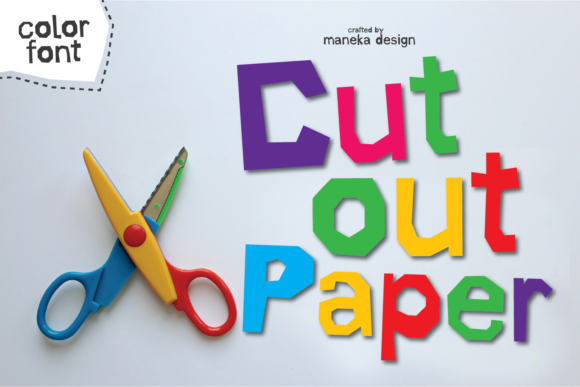
The Cut Out Paper font is designed to mimic the look of paper cutouts, giving your text a handcrafted, whimsical feel. It includes both uppercase and lowercase letters, along with numbers and punctuation marks, all stylized in a consistent paper-cutout theme. What makes this font especially versatile is its inclusion of 8 alternate colors for each glyph, allowing you to switch styles quickly and easily depending on your project needs.
This font is PUA encoded, which stands for Private Use Area encoding. This means that every special character, including the colored alternates, can be accessed using keyboard shortcuts or through font panels in design software. No need to hunt for glyphs—just select and apply them as needed.
Why Choose Cut Out Paper?
Fonts like Cut Out Paper aren’t just for show; they serve a real purpose in modern design and communication. Here’s why this particular font is gaining popularity:
- Unique Aesthetic Appeal: The paper-cut style adds a tactile, almost 3D-like quality to your text, making it ideal for invitations, greeting cards, children's books, and other creative projects.
- Color Variety: With 8 different color options per glyph, you can customize your text without needing to manually color each letter. This saves time and ensures consistency across your design.
- Easy to Use: Thanks to PUA encoding, accessing the alternate glyphs is straightforward, even for beginners who might not be familiar with more complex font features.
- High Compatibility: The Cut Out Paper font works seamlessly with major design tools like Adobe Photoshop, Illustrator, Silhouette Studio, and Inkscape. This makes it accessible to a wide range of users, from hobbyists to professionals.
When to Use Cut Out Paper in Your Projects
Whether you're designing for fun or business, there are many scenarios where Cut Out Paper can elevate your work. Here are some examples:
- Wedding Invitations: Add a charming, handmade touch by using the paper-cutout style for names, dates, or titles.
- Children’s Books: The playful look of the font is perfect for stories aimed at younger audiences, helping to capture attention and spark imagination.
- Brand Identity: If your brand focuses on eco-friendliness, arts and crafts, or nostalgia, this font could align well with your visual identity.
- Graphic Design Projects: From social media posts to posters, Cut Out Paper can make your text pop while maintaining a clean, professional layout.
- Education and Presentations: Teachers and students can use this font creatively in presentations, classroom materials, or educational infographics to break the monotony of standard text.
Compatibility and Usage Tips
While Cut Out Paper is compatible with several popular design programs, it's essential to know which platforms support it best. Here’s a quick overview:
- Adobe Photoshop & Illustrator: Fully compatible with OTF files. You can access all glyphs and colors using the Glyphs panel or Character panel.
- Silhouette Studio: Works great for cutting machines like the Silhouette Cameo. The SVG format allows for accurate rendering and easy export for physical cuts.
- Inkscape: Offers strong support for OpenType-SVG fonts, enabling full color glyph usage and scalability without loss of quality.
- Cricut: Unfortunately, Cricut does not support OTF or TTF color fonts. If you're using a Cricut machine, consider alternative methods or compatible fonts.
If you're unsure how to use a color font or want to learn more about accessing its features, many font providers offer detailed guides. For example, if you’re working with Cut Out Paper, you may want to check out the Ultimate Font Guide for step-by-step instructions and troubleshooting tips.
Common Misunderstandings About Color Fonts
Despite their growing popularity, color fonts still come with some confusion. Let’s clear up a few common misconceptions:
- Misconception 1: “I can't use it unless I’m a pro.” Reality: While color fonts do offer advanced features, they’re designed to be user-friendly. Most people can start using them effectively with just a little guidance.
- Misconception 2: “It only works in one program.” Reality: Cut Out Paper is compatible with several major design tools, but always double-check compatibility before purchasing or downloading a font.
- Misconception 3: “The colors won’t print correctly.” Reality: As long as your printer supports color fonts and you use appropriate settings, the colors should render accurately. However, for best results, always preview your design before printing.
Integrating Cut Out Paper Into Modern Life
In today’s fast-paced digital world, standing out is key. Whether you're running a small business, managing a school project, or simply expressing your creativity online, having the right tools can make all the difference. The Cut Out Paper font fits perfectly into these contexts because it blends functionality with artistic flair.
For businesses, using this font in marketing materials or branding elements can create a memorable impression. Its paper-cut aesthetic evokes a sense of authenticity and warmth, which is especially valuable in industries like education, lifestyle, or artisanal goods.
In education, teachers can leverage color fonts to make learning more engaging. Imagine using Cut Out Paper to highlight key terms in a science lesson or create themed worksheets for holidays and events. It helps keep students interested and reinforces visual learning.
On a personal level, artists and hobbyists can use the font to experiment with typography in ways that were once impossible. The ability to have colorful, styled text right in your document or design software gives you more freedom and control over your creative output.
Practical Examples of Using Cut Out Paper
To help you visualize how this font can be used, here are a few practical examples:
- Designing Social Media Graphics: Use the font to add eye-catching headlines to Instagram posts, Facebook ads, or Twitter banners. The color variety ensures your text will stand out against any background.
- Creating DIY Projects: Pair the font with actual paper cutouts for layered designs. You can also use it digitally for templates or printable decorations.
- Personalized Merchandise: Apply the font to custom t-shirts, mugs, or stickers for a unique look that feels handcrafted.
- Website Headers and Logos: For websites with a creative or crafty vibe, the font can be used to design headers or logos that reflect the site's personality.
How to Get Started with Cut Out Paper
If you're ready to try the Cut Out Paper font, here’s a simple guide to get you started:
- Download the Font: Purchase or download the font from a trusted provider. Make sure you receive the correct file type (OTF or TTF).
- Install the Font: Double-click the font file to install it on your computer. Once installed, it will appear in your system’s font menu.
- Open Your Design Software: Launch a program like Photoshop, Illustrator, or Inkscape. Select the Cut Out Paper font from the available options.
- Access Alternate Glyphs: Open the Glyphs panel (or equivalent in your software) to browse and select the colored versions of each character. Some programs may allow you to cycle through options using keyboard shortcuts.
- Experiment and Customize: Play around with spacing, size, and color combinations to suit your project. Don’t forget to save your preferences for future use!
Tips for Getting the Best Results
Here are a few tips to ensure your use of Cut Out Paper is smooth and effective:
- Always use the latest version of your design software to avoid compatibility issues.
- Check your monitor settings when previewing color fonts—some displays may alter the appearance slightly.
- Use high-resolution exports when printing to maintain clarity and detail.
- Consider layering the font with textures or backgrounds to enhance the paper-cut effect further.
The Future of Typography and Creative Expression
Typography is evolving rapidly, thanks to advancements in font technology and the rise of color fonts like Cut Out Paper. These fonts are no longer just for static text—they can now be animated, layered, and integrated into interactive designs. As more designers embrace these capabilities, we’re seeing a shift toward more expressive and dynamic typographic solutions.
Fonts like Cut Out Paper are part of this movement, offering a blend of artistry and accessibility. They empower users to bring their ideas to life with minimal effort and maximum impact. Whether you're designing for a website, a product package, or a personal project, the right font can transform the entire look and feel of your work.
Final Thoughts
The Cut Out Paper font is more than just a pretty set of letters—it’s a tool for creativity and self-expression. With its paper-cutout style, rich color options, and ease of use, it's an excellent choice for anyone looking to add a bit of charm and originality to their designs. As we continue to see the intersection of art and technology, fonts like this will play a crucial role in shaping the way we communicate and create.
So whether you're a seasoned designer or just starting out, take a moment to explore what Cut Out Paper has to offer. You might find that it's the perfect addition to your next project, helping you turn ordinary text into something truly extraordinary.